
Inventory management is where a party rental business stops being only a website and becomes an operating system. A customer may see chairs, tables, tents, linens, bounce houses, decor, AV, or photo booths on the public site, but the owner still has to know what is actually available, what is already promised, what is expected back, and what should be held back as a safety buffer.
This guide is written for small and growing rental operators who want a cleaner way to move from public catalog interest to owner-reviewed quote requests and then to internal reservations. It is not about making every customer self-book inventory. It is about collecting enough context to quote carefully while keeping the final commitment under business control.
Organize inventory the way customers shop
Customers do not think in database fields. They look for the thing that fits the event in front of them: chairs for a shower, kids tables for a birthday, a tent for a church event, linens for a banquet, a bounce house for a school field day, or a photo booth for a corporate party. The catalog should match that mental model before it tries to expose internal operations.
Start with categories that a customer would understand without help. Chairs, tables, tents, inflatables, linens, decor, AV, and photo booths are clearer than internal labels such as assets, serialized units, or miscellaneous inventory. Each category should have a real photo, a short explanation, and enough item detail for the customer to decide whether to request it.
The goal is not to show every internal note. The goal is to make the public website feel complete while protecting the operational details that belong in the dashboard. A good catalog can invite demand without pretending that every item is instantly available for every date.
- Chairs
- Tables
- Tents
- Linens
- Inflatables
- Decor
- AV
- Photo booths
Connect item interest to the quote request
Inventory pages are most useful when customers can take action from the item they are viewing. If someone clicks a gold chair, bounce house, tent package, or photo booth, the owner should not receive a vague message that says only, please send prices. The request should carry the selected item, quantity interest, date, location, and customer notes into the inbox.
That item-aware request is different from instant checkout. It gives the customer a modern shopping experience, but it does not force the business to accept the event before reviewing delivery distance, setup timing, weather policy, staff capacity, and item condition. For many rental businesses, this is the safer middle path between a static brochure and a risky self-booking system.
Worked example: a customer selects 60 white folding chairs, 8 banquet tables, and one 20x20 tent for a Saturday backyard event. The quote request should tell the owner the event date, ZIP code, requested quantities, and notes about delivery. The owner can then check whether those quantities are available across the full out-and-back window before sending a price.
- Event date
- Item quantity
- Rental period
- Delivery preference
- Address or service area
- Customer notes
Track availability across the full rental window
A rental item is rarely unavailable only during the event itself. It may leave the warehouse before the party, stay on site through pickup, return late, need cleaning, require inspection, or sit out of service because of damage. If the system only checks the party start time, the owner can still make a promise that cannot be kept.
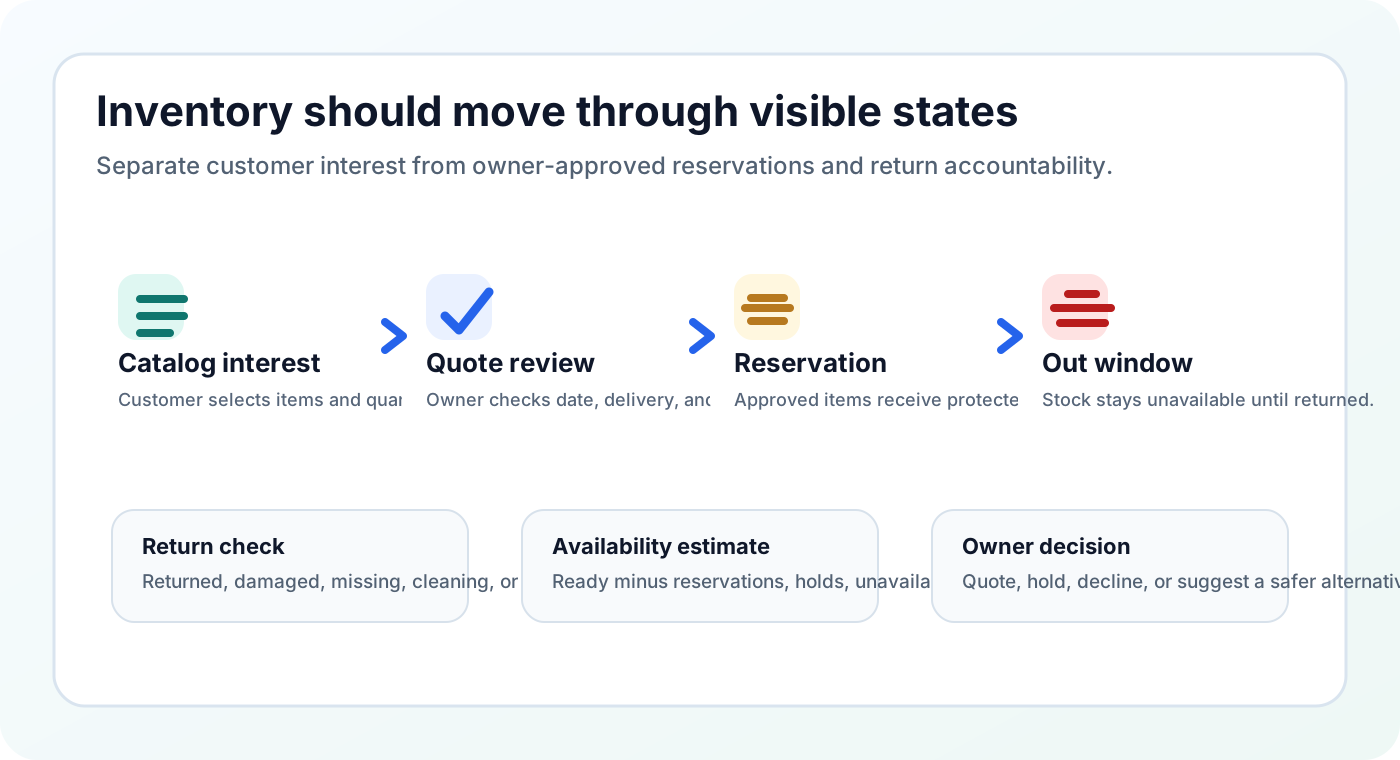
A stronger workflow tracks the out date, expected-back date, return status, and any unavailable quantity before the next quote is approved. This is where party rental inventory management differs from a simple product list. The owner needs to know what can be promised, what is tentative, what is out, and what should be treated as unavailable until someone verifies it.
Estimated availability worksheet: start with ready stock, subtract confirmed reservations, subtract tentative holds if your business protects them, subtract damaged or missing items, then subtract a safety buffer. The result is not a legal guarantee or an automatic booking decision. It is a planning number the owner can use before replying.
- Ready stock
- Confirmed reservations
- Tentative holds
- Unavailable items
- Safety buffer
Use reservations only after the owner approves the event
The public catalog should create clean demand. The internal reservation should protect a real commitment. Mixing those two steps is one of the easiest ways to confuse customers and staff. A visitor may ask about an item without being ready to book, while a confirmed event needs a stronger inventory hold that staff can trust.
Once the owner approves the event, the reservation should record the customer, event name, items, quantities, out window, expected-back window, and internal notes. If the business rents both quantity-based items and individually tracked units, the reservation view should still answer the same practical question: what is promised, when does it leave, and when must it come back?
This approach keeps the quote path honest. Customers can request the items they want, owners can review context, and inventory is reserved when the business is ready to stand behind the commitment.
- Approved event
- Reservation line items
- Out window
- Expected-back window
- Internal notes
Review inventory before publishing or promoting the catalog
A beautiful catalog can create problems if it shows items that are no longer rentable, uses confusing quantities, repeats the same photo across unrelated products, or sends customers to a quote form that does not preserve item context. Before promoting the site, owners should walk through the catalog like a customer and then check the dashboard like an operator.
Look for empty categories, missing photos, duplicate images, unclear unit pricing, hidden quantity problems, and unavailable items that should be drafted or removed. Then test the quote path from at least three real scenarios: a small chair request, a package request, and a high-demand weekend request that may create a conflict.
The best inventory system is not the one with the most fields. It is the one that helps the owner avoid accidental promises while making the customer confident enough to request a quote.
- Empty categories
- Duplicate photos
- Unit pricing
- Quote-cart test
- Conflict scenario