They can browse services, catalog items, photos, and event pages, then send a structured request when they are interested.

Party and event rental software
Party Rental Software and Website Builder
Launch a rental-ready website, let customers browse catalog pages and send quote or availability requests, then review dates, delivery, deposits, and inventory before you confirm.
14-day free trial. One plan at $99/month
Owner-reviewed quotesCollect date, delivery, item, and contact details before promising a booking.
AI business assistantAsk for follow-up, inventory, SEO, content, and dashboard help.
Website launchTemplates, custom domains, SEO pages, and pre-launch checks.
Inventory protectionDate-range reservations, conflict warnings, out tracking, and returns.
Founder launch offer
We help set up the first rental-ready version with you.
For early party and event rental customers, Eventodesk can help configure the first services, catalog items, gallery photos, quote forms, basic SEO fields, and launch checklist so you are not starting from a blank website builder.
Start Free Trial
Call 617-600-3678
Best fit: bounce houses, tents, tables, chairs, linens, photo booths, decor, and local event rentals.
Built for U.S. event rental operators
Built for the rental businesses customers search for every day.
Eventodesk is shaped around real rental questions: what you rent, where you deliver, what date the customer needs, which items may be available, and what the owner must review before taking a deposit.
Bounce houses and inflatables
Tents tables and chairs
Photo booths and AV
Wedding and event decor
Caterers and venues
Quinceaneras and family celebrations
Corporate event spaces
Party rental operators
Owner-reviewed booking flow
Instant checkout is not always the safest first step for rentals.
Party and event rentals often depend on the date, setup surface, delivery route, pickup time, service area, deposit policy, weather plan, and whether the same inventory is already promised somewhere else.
The business reviews availability, delivery, pricing, deposit terms, and customer notes before treating the event as confirmed.
Booked events can reserve items, warn about overlapping dates, and track what went out and what needs to come back.
AI business assistant
Run your party rental business with the power of AI.
Eventodesk AI sits inside the dashboard so owners can ask practical business questions while they work: what needs attention, which quotes need follow-up, whether inventory may conflict, how to improve page SEO, and how to draft useful website content.
Eventodesk AI
Business assistant for rental operators
Ask which inquiries need a reply, quote details, approval, or booking next step.
Ask about conflicts, reserved items, expected returns, and what needs attention today.
Get SEO ideas, homepage copy, article drafts, and dashboard guidance without leaving Eventodesk.
Customer flow
From the first website visit to a cleaner rental request.
Eventodesk connects the public website to the owner workflow so customers do not send vague messages and owners do not have to rebuild every quote from scratch.
The homepage explains the rental business, service area, event types, photos, catalog, contact options, and quote path.
Catalog items, packages, gallery photos, service pages, and event pages help the customer decide what to request.
The form collects event date, location, guest count, delivery preference, rental interests, and contact details.
The owner checks availability, pricing, service area, deposits, and customer notes before confirming the next step.
Booked events can hold rental items for the date range so the same chairs, tents, inflatables, or decor are not promised twice.
Track what went out, what returned, and what needs attention after the event.

Rental operations
Know what is reserved, what is out, and what is expected back.
Eventodesk connects the rental catalog to the booking workflow so owners can stop checking spreadsheets before every quote.
Check an item, quantity, out date, and expected-back date before promising a customer.
See overlapping reservations and which event is holding the items during that window.
When a quote request is marked booked, the requested rental cart becomes an inventory reservation.
Track what went out, what came back, and what was damaged or missing after the event.
Explore Eventodesk by rental workflow
Find the page that matches the problem you are solving.
Owners compare software from different starting points. These paths explain the core rental workflows without repeating the same generic pitch.
Event rental software
Website, quote requests, inventory reservations, returns, and owner-reviewed booking flow.
Party rental software for small businesses
Catalog pages, inquiry forms, follow-up, and daily workflows for growing rental teams.
Event rental inventory management software
Reservations, conflict warnings, out windows, returns, and item notes.
Party rental booking software
Online booking intent with owner review before confirmation.
Party rental website design
Templates, service pages, galleries, quote paths, domains, and SEO basics.
Bounce house rental software
Inflatables, setup details, delivery zones, safety notes, and date-first quote requests.
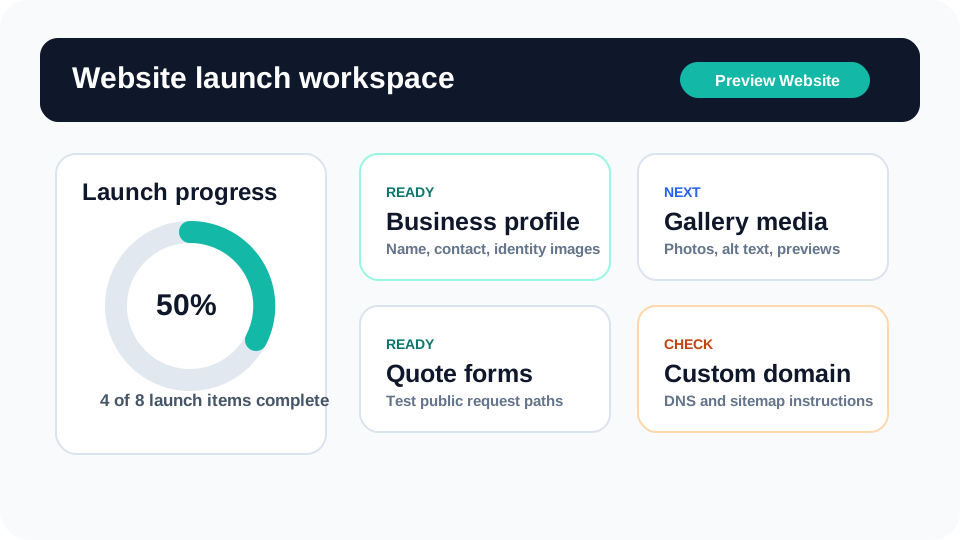
Launch workflow
A guided path that makes sense to an event business owner.
Each setup step shows what customers will experience and what the owner should review before sending traffic to the site.
- Step 1 Create business profile
- Step 2 Choose an event template
- Step 3 Add inventory services and packages
- Step 4 Configure quote and tour forms
- Step 5 Check availability and returns
- Step 6 Preview the public site
- Step 7 Publish subdomain
- Step 8 Connect custom domain
Template direction
Image-led website templates for real rental categories.
Image-led templates for every rental category: weddings, kids parties, corporate events, quinceaneras, and family celebrations.


Blog and articles
Clear, practical articles for event rental owners.
SEO content should help business owners launch, review, and improve a rental website and inquiry workflow without wasting time.
Product tutorials
New Eventodesk Tutorials for Party Rental Owners
A practical introduction to the new Eventodesk tutorial hub, built to help rental owners launch faster, understand the dashboard, and see how the software supports real daily work.
Read guide
Industry trends
Party and Event Rental Trends to Watch in 2026
A practical 2026 trend guide for rental owners watching AI, faster replies, inventory visibility, local search, personalization, and self-service.
Read guide
Eventodesk AI
Introducing Eventodesk AI for Party Rental Operators
A practical look at how Eventodesk AI helps rental owners handle follow-up, inventory questions, SEO, content drafts, and dashboard decisions without giving up control.
Read guideSimple pricing
14-day free trial
One flat plan after the trial. Websites, quote forms, AI assistance, inventory reservations, conflict checks, return tracking, domains, SEO, and support are included.
$99
per month after trial
Start Free Trial
Common questions
Party and event rental software FAQ
What kind of business is Eventodesk for?
Party rental businesses, bounce house operators, tent and chair companies, photo booth vendors, wedding decor teams, AV rentals, caterers, venues, planners, churches, schools, and corporate event providers.
Does Eventodesk replace instant checkout?
Eventodesk starts with owner-reviewed quote and availability requests because many rentals need a date, delivery, inventory, deposit, and service-area check before confirmation.
Can customers browse rental inventory?
Yes. Owners can show rental categories, item photos, prices, packages, galleries, and quote buttons so customers can request the right items with useful context.
How much does Eventodesk cost?
Eventodesk has a 14-day free trial and one professional plan at $99/month after the trial unless canceled.
Can I use my own domain?
Yes. Eventodesk includes a custom-domain path so owners can launch on an Eventodesk URL first, then connect a business-owned domain when DNS is ready.
Build the rental website customers can trust before they call.
Create the account, add the business profile, choose a template, preview the site, and publish when the launch checks are ready.