
Catalog and inventory
Services, Rental Catalog, and Inventory Tutorial
Organize what customers can browse and what owners must protect: services, packages, categories, rental items, quantities, pricing units, and reservation context.
What you will learn
By the end, you should understand the difference between service pages that sell and inventory records that protect the business.
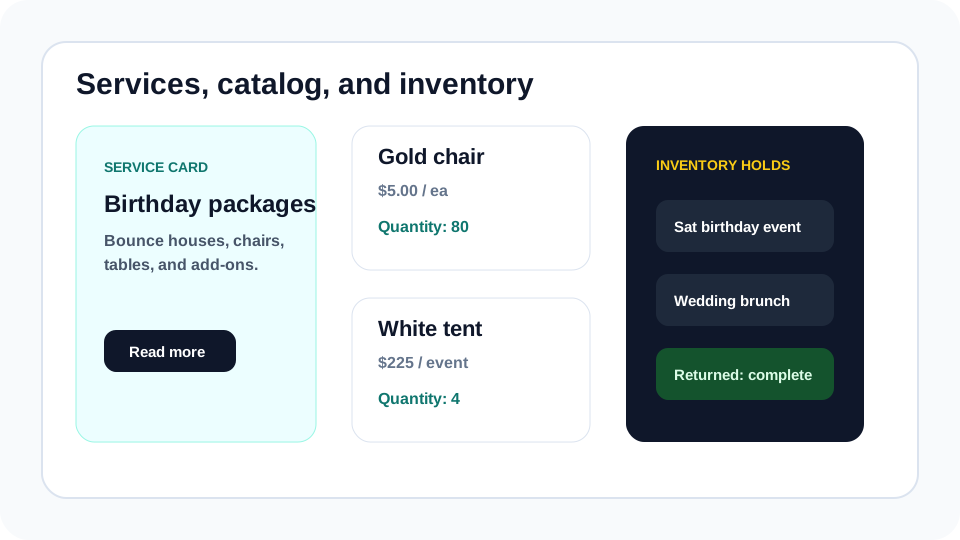
Services and catalog items solve different problems. Services explain what customers can hire you for: birthday packages, tent rentals, wedding setups, school events, photo booths, or corporate rentals. Inventory records explain what the business owns, how many are available, and what must be protected from overlap.
A good Eventodesk setup uses both. The public website gives customers enough clarity to request the right thing, while the dashboard helps owners reserve items for booked events and avoid promising the same stock twice.
Step by step
Use this workflow in order
These steps are written for an owner or office team member trying to finish real work, with plain instructions and practical checkpoints.
- Create broad service pages first Start with 3 to 6 services or packages customers naturally understand before adding every small inventory item.
- Add catalog categories Group rental items into categories like chairs, tables, tents, inflatables, concessions, linens, decor, AV, or photo booth add-ons.
- Add item photos, price units, and quantities Use clear item names, realistic quantities, price labels, and featured status for the items customers should notice first.
- Reserve inventory for real events Use date-range reservations or booked-event holds so the dashboard can warn about overlaps.
- Review returns and damage notes Inventory protection continues after delivery. Track returned, damaged, or missing items so the next quote is based on reality.
Workflow map
What to look for inside Eventodesk
Service cards
Sell the event outcome and link customers to more detail.
Catalog categories
Make browsing easier by grouping items the way customers think.
Rental item detail
Show photo, description, unit price, quantity, and quote action.
Reservations
Protect items during the full out-and-return window.
Return tracking
Record what came back, what is damaged, and what needs attention.
Why it helps the business
Business value
- Customers understand what to request without calling for every basic question.
- Owners reduce double-booking risk by separating browsing from confirmed reservations.
- Inventory records make weekend planning and return accountability easier.
Avoid these mistakes
Common problems
- Putting every item into services instead of using catalog categories for browseable rentals.
- Showing prices without making clear that final availability and delivery are owner-reviewed.
- Failing to update returned, damaged, or missing status after the event.
Start here
Turn the catalog into a sales tool and an operations tool.
Use services to explain value, catalog items to help customers browse, and inventory reservations to protect confirmed work.
Related Eventodesk pages
Use these pages to connect the tutorial workflow to product value and conversion.
Plan the next step
Use these pages when you are deciding whether Eventodesk fits your rental business.