
Double-bookings rarely come from one obvious mistake. They usually come from a set of small gaps that look harmless on their own: a quote request in the inbox, a tentative hold in a spreadsheet, a calendar note without the due-back time, and an owner trying to remember which items are already promised.
The prevention work starts by treating availability as an operations question, not just a calendar question. A rental business needs to know what is reserved, when it leaves the warehouse, when it is expected back, whether it needs cleaning or inspection, and whether another event is already depending on the same inventory.
Double-bookings usually start before the calendar
A calendar can show that Saturday is busy, but it does not always show why inventory is risky. One customer may have asked for chairs through a contact form, another may have a deposit pending, and a third may have been promised the same item verbally. If those signals live in separate places, the owner has to perform the availability check from memory.
A stronger workflow brings the event, item, quantity, status, out time, expected return, and notes together before anyone says yes. The point is not to make the business rigid. The point is to make the risk visible early enough that the owner can pause, ask a better question, or offer a different item.
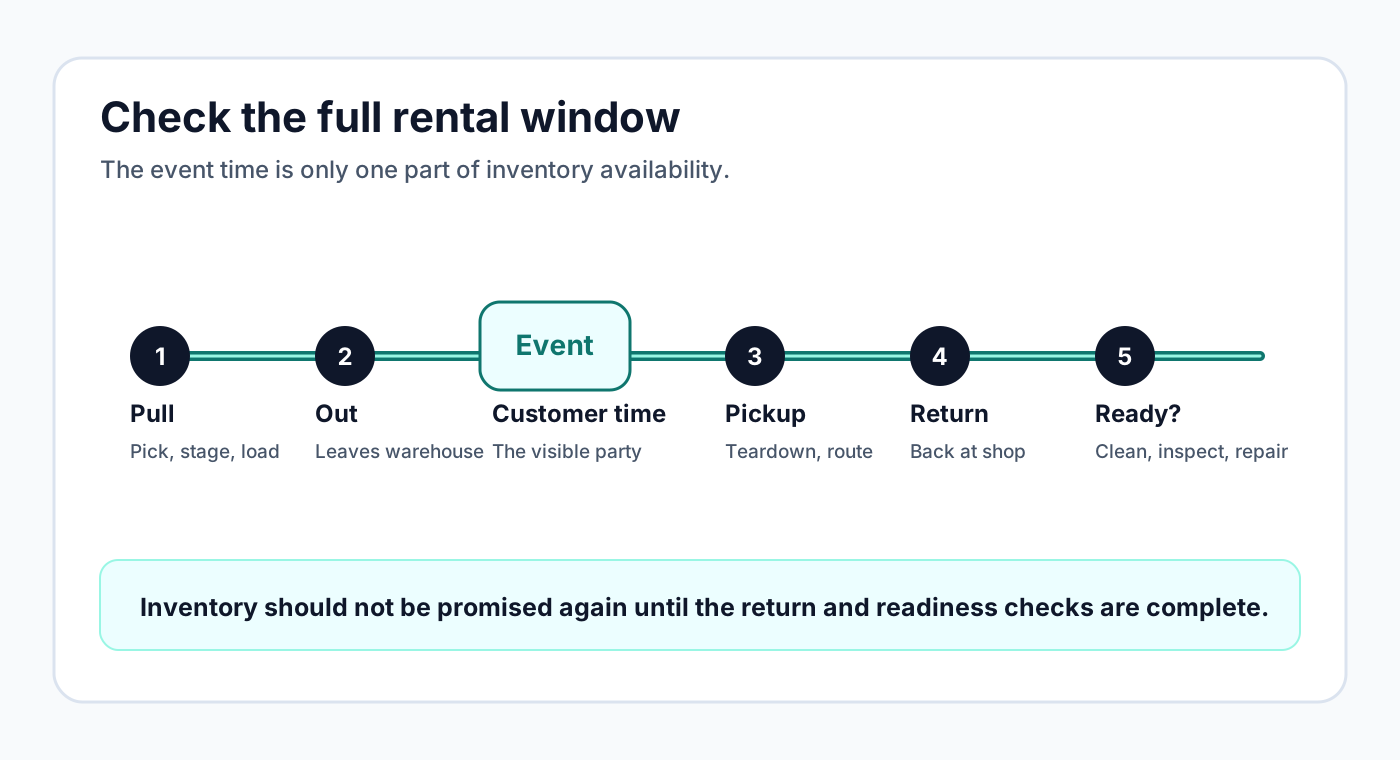
Track the full rental window, not just the event date
The event date is only the customer-facing part of the rental. The inventory may be unavailable before the party starts because it needs to be pulled, loaded, delivered, staged, set up, or held for a morning route. It may also be unavailable after the party ends because it still needs pickup, warehouse return, cleaning, drying, charging, inspection, repair, or restocking.
That is why a useful conflict check needs the full operational window. If a tent leaves Friday afternoon for a Saturday wedding and is expected back Sunday morning, it should not look available for a second Saturday event. If linens return Monday but need cleaning before they can go out again, the next safe promise may be Tuesday or Wednesday, not the moment the event ended.
Separate inquiries, tentative holds, and confirmed reservations
Not every request should block inventory with the same force. A casual question from a customer, a quote awaiting missing details, a tentative hold for a serious buyer, a paid booking, and an internal maintenance hold are all different. Treating them as identical can either overblock the schedule or let real commitments disappear into the noise.
A practical status system tells the owner how seriously to treat the hold. An inquiry might not reserve anything yet. A tentative hold might warn the owner before quoting another customer. A confirmed reservation should count against available quantity. An out status should make it clear the item has left the warehouse. Returned, damaged, and missing statuses should decide whether the item can be promised again.
Quantity-based inventory needs more than yes or no
Single-unit rentals are already easy to double-book if the schedule is scattered. Quantity-based inventory is even trickier because the item can be partly available. A business may own 100 white folding chairs, but that does not mean 100 are safe to promise this weekend. Some may be reserved, some out, some damaged, and some held for a pending quote.
The availability view should answer a practical question: how many can the owner safely promise for the requested window? That requires reserved quantity, available quantity, conflicting events, and return status. It also requires discipline from the team. If returned items are not marked back in, or damaged items are not removed from availability, the software cannot protect the business from bad data.
Worked example: 100 chairs across two weekend events
Imagine a rental business owns 100 white folding chairs. Event A reserves 60 chairs, leaves the warehouse Friday at 2 PM, and is expected back Sunday at 9 AM. Event B asks for 50 chairs for Saturday afternoon. On the surface, a simple date field might tempt the owner to check Saturday and make a quick promise. The real count says otherwise.
If 60 chairs are already out for Event A, only 40 remain. If 10 chairs are damaged or waiting for repair, only 30 are usable. If Event B needs 50, the request cannot be safely approved without changing the plan. The owner could offer 30 chairs, suggest a different chair style, rent additional chairs from a partner, or decline the date. What should not happen is a fast yes based only on the fact that the customer's event date was typed into a form.
Now add a return buffer. If Event A returns Sunday at 9 AM but inspection and cleaning take four hours, those chairs may not be ready for a Sunday morning graduation event. A good workflow makes that buffer visible so the owner can protect the next event instead of discovering the shortage during loading.
Late returns and damaged items change the next promise
Double-booking risk often appears after the first event, not before it. A bounce house may come back wet. Linens may need another cleaning cycle. A photo booth printer may fail inspection. A table cart may return missing hardware. If the next quote assumes those items are ready, the business has already created the conditions for a painful phone call.
The return process should update availability. Returned means the item came back. Ready means it can be promised again. Those are not always the same thing. For high-demand items, separating returned, damaged, missing, and ready statuses can be the difference between a smooth weekend and a scramble.
Manual overrides should be intentional, not accidental
There are legitimate reasons to override a warning. The owner may know a second crew can pick up earlier, a substitute item is acceptable, or a partner company can cover the shortage. The problem is not the override itself. The problem is overriding without context and leaving the next staff member to guess what happened.
When an owner accepts a risky request, the workflow should capture the reason. A note such as "customer approved silver chairs instead of white" or "partner vendor supplying 20 extra chairs" gives the team something to trust. Without that note, the override becomes another hidden promise.
Keep the final yes under owner control
Automated availability is helpful, but party rentals still depend on delivery capacity, setup crew, service area, item condition, weather policy, customer details, and payment or deposit expectations. A website can collect the request quickly without pretending the event is final.
The safer approach is to let customers send structured booking intent while the owner reviews the full picture before confirmation. That gives customers a modern request path and gives the business room to check the details that software cannot magically know unless the team keeps the records accurate.
No tool can guarantee that double-bookings will never happen. The business still needs accurate inventory counts, disciplined return updates, honest statuses, and staff training. The goal is to reduce preventable conflicts and make risky decisions visible before the owner sends the final yes.