
Party rental SEO works when the page is useful to someone planning a real event. Search engines and AI systems can understand the business better when the website explains rental categories, service areas, photos, policies, and quote paths in plain language.
The weak version of SEO is a stack of nearly identical pages with a city name swapped in. The stronger version gives customers enough information to decide whether the company is a fit and gives the owner a clean path to receive the request.
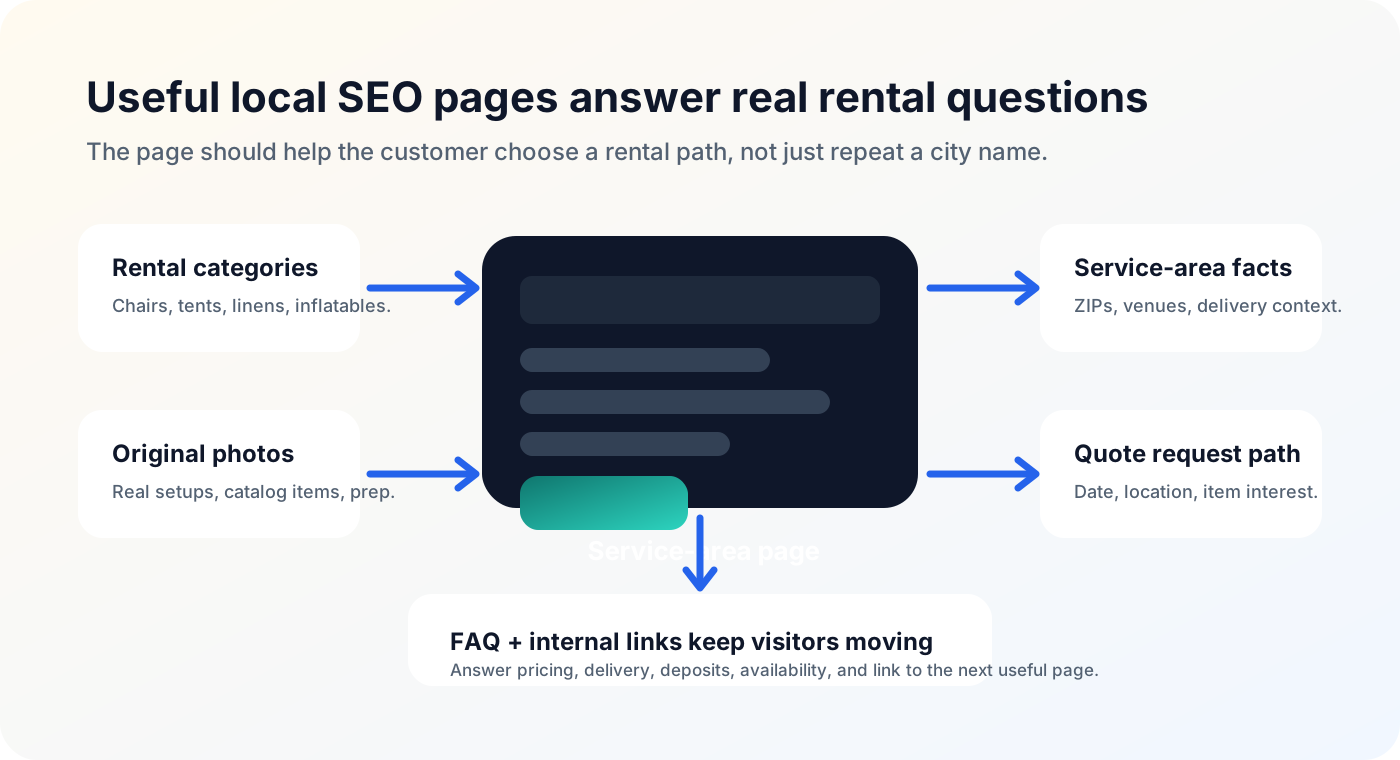
Write for the customer who is actually planning an event
Party rental SEO works best when the page helps a person decide whether the business can serve their event. A parent planning a backyard birthday, a school coordinator organizing a field day, or a venue manager checking table and chair options is not looking for a keyword list. They want to know what the company rents, where it delivers, what the photos look like, and how to ask for availability.
Search systems have become better at recognizing whether a page answers a real question. That does not mean every page needs to be long. It means the page should include useful context: rental categories, event types, service-area details, original photos, FAQs, policies, and a clear next step. A thin page that only swaps the city name is unlikely to build trust with customers or search engines.
The practical test is simple: if a customer landed on the page from search, would they know whether to request a quote? If the answer is no, the page needs more customer-facing detail before it needs more keywords.
Use service-area pages carefully
Service-area pages can help when they contain real, useful information. A strong page might explain delivery context, neighborhoods or ZIP codes served, venue types, pickup options, setup considerations, local event examples, and which rentals are commonly requested in that area. The page should help a customer understand fit before they submit a form.
Do not create dozens of nearly identical pages with only the location changed. That creates a maintenance problem for the business and a quality problem for search. If the page would not help a customer, it is not a good SEO asset. Better to publish fewer strong pages than many weak ones.
Worked example: a Miami-area chair and tent rental company could create one honest service-area page that explains Downtown Miami, Brickell, and Miami Beach delivery context, common venue restrictions, parking or loading considerations, and the exact ZIP codes normally reviewed. That is more useful than separate near-duplicate pages that repeat the same paragraph for every neighborhood.
Photos are both trust signals and search context
Original photos help customers believe the business has the inventory and experience it claims. They also give search systems more context when the file name, alt text, caption, and surrounding copy are clear. A real photo of the company's tent setup, chair rows, bounce house delivery, linen display, or photo booth station is more persuasive than a generic inspiration image.
Use business-owned images whenever possible: finished setups, catalog items, warehouse prep, delivery context, package examples, and detail shots that show condition. Avoid pretending generic inspiration photos are your work. If a photo is decorative, the alt text can be empty. If the photo explains a product or setup, use plain-language alt text that describes what is visible without stuffing keywords.
A strong photo system also helps conversion. Customers often compare rental businesses visually before they read every paragraph. If the photos look real, organized, and relevant to the service area, the quote form feels less risky to complete.
Quote forms turn SEO traffic into follow-up
Ranking for a useful search is only valuable if the visitor has a clear next step. A quote form should be visible from service pages, item pages, galleries, and service-area content. It should not feel like a generic contact form bolted onto the site after the fact.
The form should collect enough context for the owner to respond: event date, event location, item interest, event type, guest count, delivery or pickup preference, and contact details. The customer should understand that the request is reviewed by the business before anything is confirmed. That wording is especially important for rentals where inventory, delivery, and setup conditions can change the answer.
No page can guarantee rankings or bookings, and the form should not promise instant availability if the business does not operate that way. The better promise is clarity: customers can ask for what they need, and the owner receives enough information to respond professionally.
Internal links help people and search systems understand the site
A party rental website should not be a stack of isolated pages. Link from service-area pages to rental category pages, from category pages to quote requests, from galleries to relevant services, and from blog guides to the commercial pages that explain the workflow. The links should feel like help, not like a keyword dump.
Vary the anchor text naturally. A service-area page might link to chair rentals with a phrase like browse chair options. A blog guide might link to Eventodesk inventory software when it explains availability. A template page might link to pricing when the customer is ready to evaluate the platform. The right link depends on intent.
Good internal links make the next step obvious and help search systems understand which pages matter for each topic. They also keep visitors from reaching a dead end after they learn something useful.
Review SEO like an owner, not only like a marketer
Before publishing a page, read it from the customer's point of view and from the owner's point of view. The customer should understand the offer, service area, photos, next step, and what happens after the request. The owner should receive the details needed to follow up without reopening the conversation from zero.
A useful page also needs technical basics: a unique title, a readable meta description, one canonical URL, crawlable internal links, descriptive image alt text where appropriate, and no accidental noindex tag on pages meant to rank. Those basics do not replace quality content, but they prevent good content from being harder to discover.
This is where a rental-specific platform can help. The website builder, catalog, forms, media fields, service areas, and SEO metadata should work together so owners do not have to rebuild the same structure manually on every page.